Insights
Your sales funnel from a seller starting your form to the car picked up, where sellers drop out, and what to fix first.
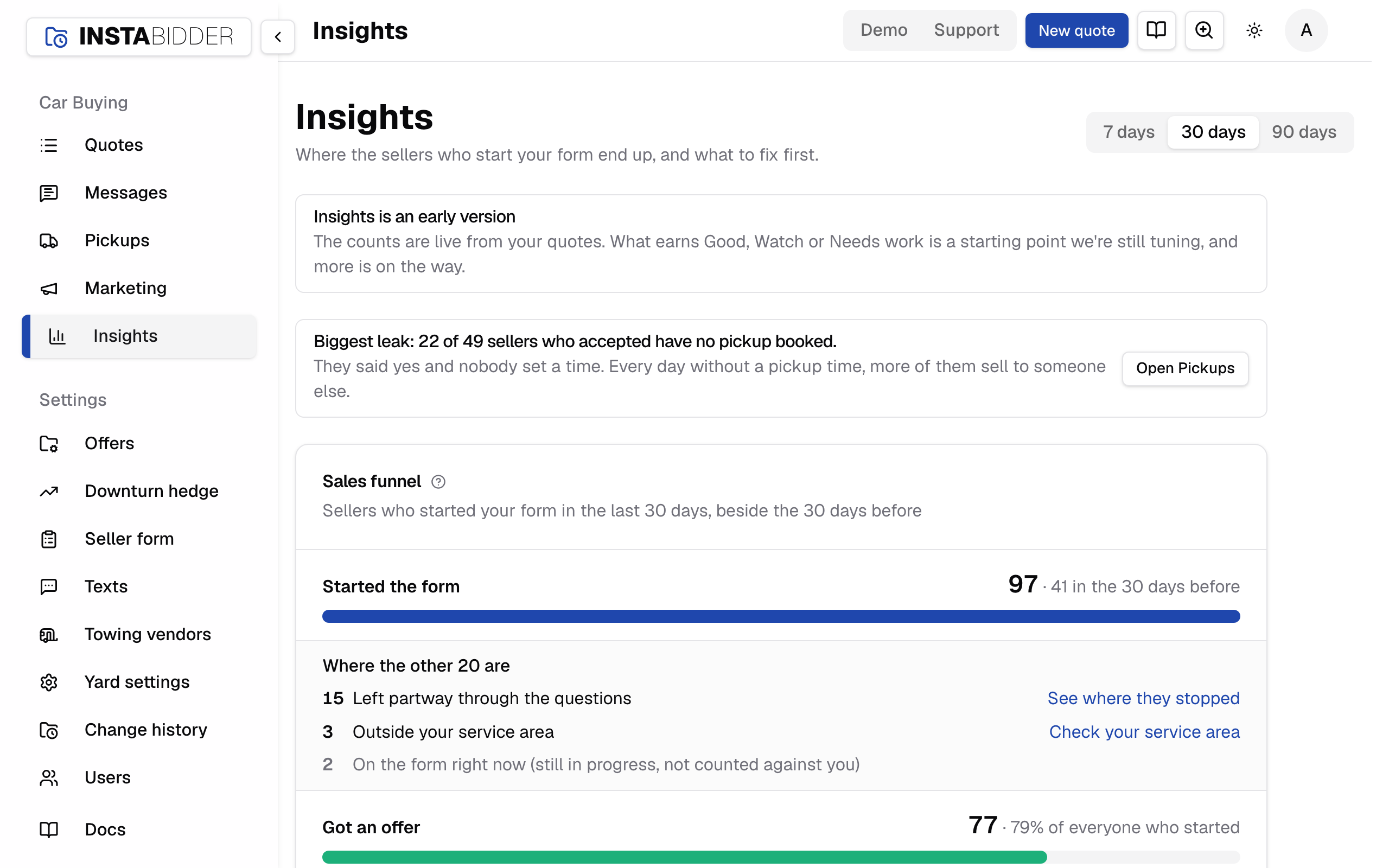
Insights follows every seller who started your form, step by step, until the car is picked up. It shows how many made it to each step, where the rest went, and which leak to fix first.
Note
Insights is an early version. The counts are live from your quotes. What earns Good, Watch or Needs work is a starting point we're still tuning, and more is on the way.
Everyone who signs in can open Insights, Staff included. It's in the sidebar under Car Buying. There's nothing to save here.
Sales funnel
How many sellers who started your form reached each step: got an offer, accepted, had a pickup booked, and were picked up. Between the steps it lists where the others went.
Pick 7 days, 30 days or 90 days at the top. The page counts the sellers who started your form in that time and follows each one to where they are now, so a seller who started last week and was picked up today counts as picked up.
Quotes your team starts on the phone aren't counted. They never used the form, so they'd hide what the form is doing.
The steps
| Step | A seller counts when |
|---|---|
| Started the form | They entered a ZIP code and went on |
| Got an offer | They were shown an offer, or your team accepted or declined one for them |
| Accepted | They said yes, on the form or to your team |
| Pickup booked | A pickup time is set |
| Picked up | The pickup is marked picked up |
Each step shows its count, its share of the step before, and its share of everyone who started. The bar is that last share.
Where the others went
Under each step is a list of the sellers who didn't reach the next one. Every seller is in exactly one place, so the numbers add up.
| Where | What it means | Where to fix it |
|---|---|---|
| Left partway through the questions | They started and stopped before the offer | Results shows the step they left on |
| Outside your service area | Their ZIP code is farther than you pick up | Service area |
| Saw the offer and chose nothing | They got a number and didn't answer | Quotes, filtered to Offer out, to follow up |
| Declined the offer | They said no; their reasons are listed under it | Offers |
| Accepted, no pickup booked | They said yes and no time is set | Pickups |
| Marked lost | Your team marked the quote lost after the seller said yes | Quotes, filtered to Lost |
| Pickup time passed, not marked picked up | The time came and went and the quote still says booked | Pickups: mark it picked up or book a new time |
Each link opens the page that fixes that leak. That page shows ← Insights above its title, which brings you back to the same period.
Sellers still in progress are listed apart and don't count against you: someone on the form or looking at an offer in the last hour, someone who accepted in the last hour, and a pickup whose time hasn't come yet.
Good, Watch and Needs work
Each step after the first gets a verdict, from the share of sellers who went on out of those who either went on or dropped out.
| Step | Good | Watch | Needs work |
|---|---|---|---|
| Got an offer | 60% or more | 40% to 59% | Under 40% |
| Accepted | 30% or more | 15% to 29% | Under 15% |
| Pickup booked | 80% or more | 60% to 79% | Under 60% |
| Picked up | 90% or more | 75% to 89% | Under 75% |
These are starting numbers, the same for every yard. A step with fewer than 10 sellers who went on or dropped out says Not enough sellers yet instead: one seller out of two isn't a 50% problem.
Beside the verdict, "Up 5 points on the 30 days before" compares the step with the same number of days before your period. It shows only when both periods have enough sellers.
The biggest leak
The line at the top names the one thing to fix first: the step doing worst, and where most of its sellers went. It says what that usually means, and its button opens the page where you fix it.
- Too few sellers to judge any step: the fix is getting your form in front of more sellers, and the button opens Marketing.
- Every step doing well: it says so, and points at Marketing for more sellers.
When nobody started
If no seller started your form in the period, the page says so. Check the form is on your website with Where it appears, then use the QR code on Marketing to put it in front of sellers.